Why Is Customer Service Automation Software Now on Every Leadership Agenda?
Las soluciones de software de automatización del servicio al cliente se han vuelto cada vez más populares en el ámbito del compromiso del cliente. Como exploramos en nuestro artículo sobre la automatización del servicio al cliente, los centros de contacto y los departamentos de servicio al cliente de todas las industrias han estado apostando por soluciones de automatización para acelerar sus procesos, aumentar sus resultados y, en última instancia, atender a más clientes de mejor manera y más rápidamente.
Muchas herramientas de software de automatización de servicios al cliente solo incluyen características como chatbots, creadores de bases de conocimiento, respuestas predefinidas o encuestas de satisfacción del cliente automatizadas. Sin embargo, nuestra definición de la automatización del servicio al cliente va mucho más allá.
Hemos definido la automatización del servicio al cliente como cualquier tipo de medida o tecnología diseñada para automatizar cualquier parte de los procesos relativos a las operaciones de servicio al cliente, no necesariamente solo las interacciones entre clientes y representantes. Esto puede incluir IA conversacional, agentes de IA, análisis de IA automatizado o herramientas de automatización de flujos de trabajo. En este artículo nos centraremos en estas últimas, echando un vistazo más de cerca a Flow, nuestra herramienta de software de automatización de servicios al cliente.
Flow puede capacitarte para modelar y automatizar por completo los recorridos del cliente desde cero, así como ajustarlos y readaptarlos para satisfacer las necesidades de tus clientes sobre la marcha, con una interfaz intuitiva de arrastrar y soltar. Con Flow, podrás diseñar y automatizar fácilmente tus operaciones de servicio al cliente de principio a fin, integrar cualquier canal que se te ocurra, implementar un seguimiento automático de la satisfacción del cliente, y asociarte con inteligencia artificial para alcanzar niveles de eficiencia sin precedentes, todo ello sin escribir ni una sola línea de código.
En este artículo, hablaremos brevemente sobre por qué y cómo la generalización de la automatización de flujos de trabajo será un cambio de juego para el ámbito del compromiso del cliente y explicaremos cómo nuestra herramienta de software de automatización del servicio al cliente Flow puede ayudar a tu centro de contacto o departamento de servicio al cliente.
What Does Customer Service Automation Software Actually Do, and How Does It Work?
El software de automatización del servicio al cliente puede implementarse de diversas maneras y para diversos propósitos. Como mencionamos anteriormente, esto puede incluir IA Conversacional, Agentes de IA, Analíticas de Interacción con el Cliente de IA, encuestas automatizadas de satisfacción del cliente (CSat), herramientas de creación de bases de conocimiento, o, como en el caso de Flow, automatización de flujo de trabajo y mapeo de la ruta del cliente.
Aunque estos tipos de herramientas de automatización difieren en función, todas apuntan hacia el mismo conjunto de beneficios:
Reducción de costes
Tiempos de resolución más rápidos
La capacidad de ofrecer soporte 24/7 durante el tiempo libre de los agentes
Recolección de retroalimentación del cliente más rápida y completa
Minimización del error humano
En particular, la automatización de flujos de trabajo puede contribuir a tiempos de resolución más rápidos, minimización del error humano y reducción de costes más que cualquier otra forma de automatización del servicio al cliente, así como una mejor gestión de la interacción con el cliente. Hay algunas razones por las cuales esto es así.
En los centros de contacto tradicionales, una parte significativa del tiempo de los agentes se dedica a tareas mundanas como buscar información del cliente o dirigir llamadas a los departamentos apropiados. Según un estudio realizado por IBM, estas tareas pueden consumir hasta el 75% de la jornada laboral de un agente.
Esto no solo conduce a tiempos de espera prolongados, lo cual es frustrante para los clientes y consume recursos para las empresas, sino que también contribuye al agotamiento de los agentes. Como consecuencia, hay una mayor tasa de rotación entre agentes, lo que resulta en inversiones considerables de tiempo y recursos en la contratación y formación de reemplazos.
Al implementar la automatización de flujos de trabajo, puedes abordar estos desafíos mientras mejoras los procesos y la productividad. Utilizar el software adecuado de automatización del servicio al cliente te permite automatizar tareas que impiden a los agentes concentrarse en el servicio al cliente principal.
Con Flow, nuestra plataforma de automatización de flujos de trabajo, puedes automatizar diversas tareas, incluyendo el enrutamiento de llamadas y la transferencia de datos desde bases de datos directamente a las pantallas de los agentes. Además, al integrar nuestras características de Inteligencia Artificial en tus flujos de trabajo automatizados, puedes manejar consultas rutinarias usando nuestro Agente de IA o categorizar eficientemente las consultas según tema, habilidad o prioridad.
Así es como funciona Flow:
Summary
Customer service automation software performs parts of a service interaction (understanding a request, deciding what to do and acting on it) without a person handling every step. It spans fixed rules to AI-driven systems, so capabilities differ by product, and it is not the same as a chatbot or a CRM.

What Types of Customer Service Automation Can You Choose From?
“Vimos que el tiempo promedio de conversación en una de nuestras campañas más grandes pasó de 10 minutos a 6 minutos gracias a flujos automatizados. Esto significa que un solo agente ahora puede atender llamadas mucho más rápido, porque están completando las llamadas mucho más rápido.”
Zohar Green, Digicall
Flow está diseñado por nuestro equipo de expertos para hacer que la automatización del servicio al cliente sea más fácil que nunca. Utilizando una interfaz intuitiva de arrastrar y soltar, podrás diseñar cada punto de contacto en el mapa de la experiencia del cliente, incluyendo cualquier canal y vinculando cada paso como quieras. Esto no solo permite interacciones más rápidas, efectivas y coherentes gracias a la automatización; también constituye un sistema de gestión de interacciones con clientes unificado e impecable, donde cada consulta del cliente se dirige y organiza siguiendo reglas estrictas.
También puedes combinar tus procesos de servicio al cliente con nuestra sofisticada suite de inteligencia artificial para clasificar y dirigir consultas por habilidad requerida, tema o prioridad, con funciones como Clasificación por Frases Clave o Análisis de Voz. Flow también te permite implementar Athena AI y dirigir consultas rutinarias a nuestro Agente de IA, impulsado por nuestro LLM (Modelo de Lenguaje Grande) desarrollado completamente internamente, liberando a tus agentes para que concentren sus habilidades en interacciones de alto valor.
Después de configurar el viaje del cliente, todos los pasos estarán completamente automatizados. Esto resultará en tiempos de espera reducidos exponencialmente y niveles de eficiencia sin precedentes para tus equipos.
¿Cómo funciona Flow?
Con Flow, nuestra herramienta de software de automatización de servicio al cliente, diseñarás los viajes de tus clientes vinculando tres tipos de nodos: desencadenantes, condicionales y acciones.
Primero, tienes los Desencadenantes; o, en otras palabras, las acciones que inician un flujo. Los desencadenantes pueden ser alguna forma de comunicación entrante, como un mensaje de texto o una llamada telefónica, pero también pueden ser una solicitud de API, un comentario en redes sociales o la importación de un contacto a través de API.
Luego, están los Condicionales. Una vez que se ha activado un Desencadenante, un Condicional verificará si la interacción cumple con ciertos criterios o se ajusta a una categoría determinada, y luego la dirigirá automáticamente a donde debería estar. Los desencadenantes pueden basarse en si se ha mencionado una determinada palabra clave o frase clave, en si una interacción cumple con ciertas reglas, en si tiene alguna etiqueta asignada, y más. También puedes usar Athena en tus Condicionales, empleándola para capturar información sobre un cliente, transcribir el contenido o su llamada, o hacerles preguntas a través del Chat en Vivo.
Finalmente, están los nodos de Acción, que son los resultados de la interacción. Las acciones determinan la manera de responder a un Desencadenante determinado después de que ha sido procesado por un Condicional. Hay casi 30 tipos diferentes de acciones: enviar un mensaje saliente en cualquier canal, mover un contacto a una nueva lista de datos, cerrar una interacción, capturar CSAT, o asignar etiquetas a una interacción son algunos de ellos.
Ahora, para ver cómo funcionaría esto en el campo, veamos un ejemplo de un servicio al cliente rutinario automatizado con Flow:
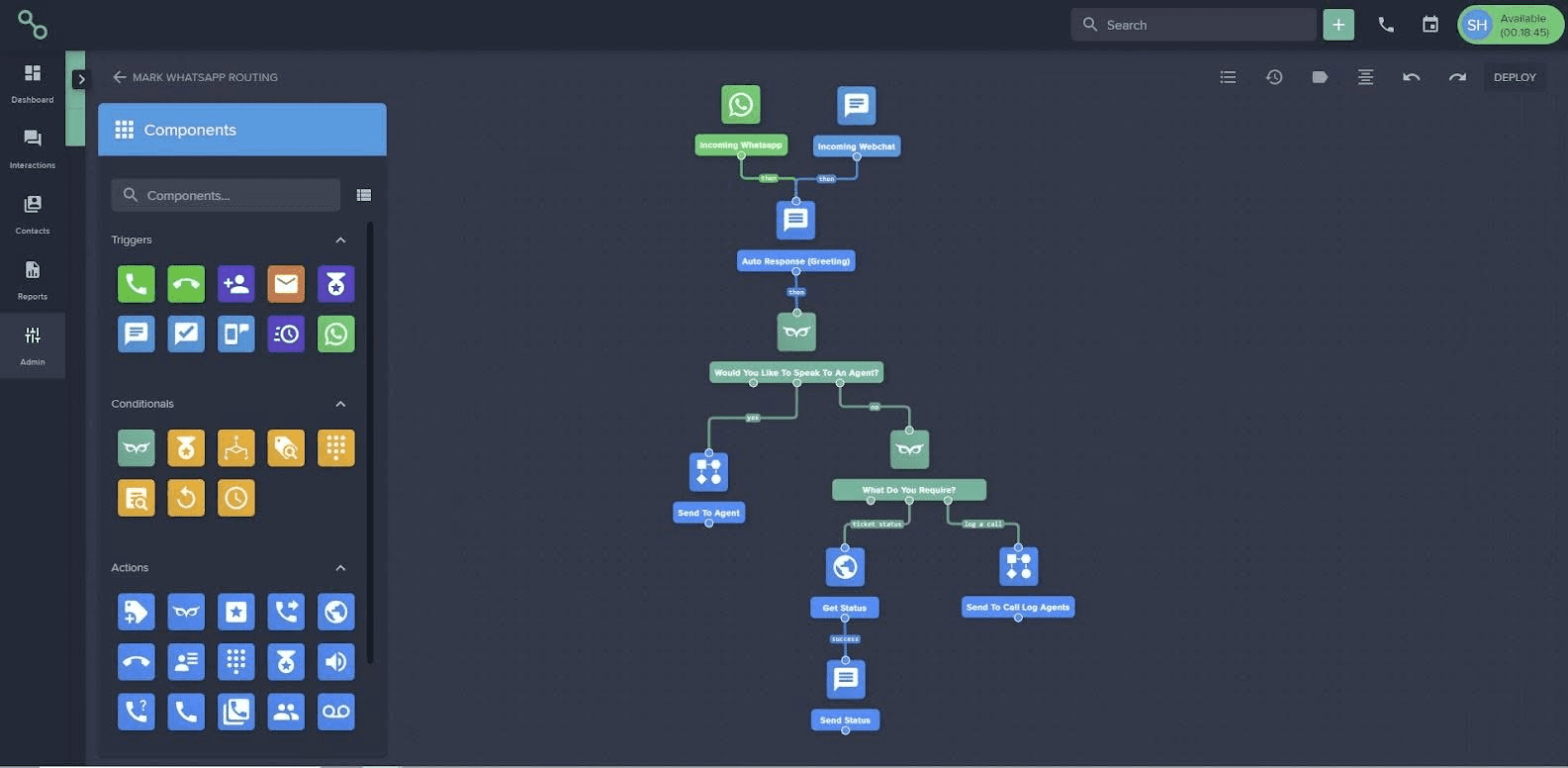
En resumen, este flujo está destinado a capturar la información del cliente con cada nueva interacción a través de WhatsApp o LiveChat y luego, basándose en esa información, enviar a dicho cliente a diferentes colas, dependiendo de si la interacción se clasifica mejor como perteneciente a Cuentas Vencidas, Cliente Existente o Oportunidad de Venta Adicional.
Aquí, el flujo se desencadena por un mensaje de WhatsApp o un mensaje de LiveChat. Luego, Athena captura la información relevante de tu cliente a través de indicaciones de texto. Luego, esto activa un nodo de Acción destinado a buscar información previamente capturada. Si no se encuentra información previa, en otras palabras, si la persona que envía el mensaje de texto nunca ha contactado con el negocio antes, su consulta se envía a un agente. Si se encuentra alguna información, se filtra a través de un nodo Condicional: se evalúa contra tres categorías predefinidas; y dependiendo de la categoría a la que pertenezca, la consulta del cliente se envía a la Cola de Cuentas Vencidas, a la Cola de Clientes Existentes, o a la Cola de Oportunidad de Venta Adicional.
Este flujo en particular sería útil para una empresa con un modelo de negocio de suscripción, donde sería esencial para los representantes de servicio al cliente saber si un cliente ya tiene una suscripción, si está atrasado en sus pagos, o si no tiene una suscripción pero podría estar interesado en una.
Sin embargo, las condiciones y los parámetros para estos nodos podrían personalizarse infinitamente para adecuarse a cualquier otra forma de filtrar clientes y dirigir sus consultas.
En este otro artículo, hemos explicado Flow, nuestra herramienta de software de automatización del servicio al cliente, con más detalle, también mostrando otros ejemplos de flujos de trabajo automatizados que podrían adaptarse a diferentes tipos de negocios, centros de contacto o departamentos de servicio al cliente.
Where Does Customer Service Automation Deliver the Most Value in Practice?
The strongest use cases share three characteristics: high volumes, repeatable processes and information stored in existing systems. These are areas where customer service automation software can deliver immediate operational benefits.
Order and account enquiries are a natural starting point. Questions such as "where is my delivery?" or "what is my balance?" are repetitive and straightforward to answer. Connecting automation to the relevant systems allows customers to get instant responses at any hour, reducing routine enquiries in agent queues.
Triage and routing helps customers reach the right team sooner. Call Center AI software can use Smart Call Routing to identify enquiry types, verify customer details and pass relevant context to agents. This reduces unnecessary transfers and means customers do not have to repeat themselves.
Out-of-hours support is particularly useful for businesses serving customers across time zones. An AI Virtual Assistant can resolve straightforward requests overnight and log more complex cases for the morning. The same approach works for payments, bookings and account changes, such as rescheduling appointments or updating addresses.
Agent assistance and quality monitoring support the people handling more complex interactions. Agent-assist tools can summarise calls, draft notes and suggest relevant knowledge articles. Research cited earlier found an increase of around 30% in issues resolved per hour, with the greatest gains among less experienced staff. Meanwhile, analytics tools can assess every interaction for quality and compliance, while proactive notifications help address issues such as delayed orders before customers need to make contact.
What Impact Can You Expect?
McKinsey Global Institute estimates that generative AI could increase customer care productivity by 30 to 45% of current function costs. This is a modelled estimate rather than a measured outcome, so it indicates potential rather than guaranteed savings.
Actual results depend on the platform, data quality, knowledge content and system integrations. When evaluating customer service automation software, ask vendors to demonstrate how their solutions handle your specific enquiries and workflows using realistic scenarios from your business.
Summary
Customer service automation software adds most value where enquiries are frequent, rules are clear and data is accessible: order and account questions, triage, out-of-hours cover, simple transactions, agent support and quality monitoring. It is designed to relieve queue pressure and repetitive work, though capabilities and results differ between platforms and should be tested against your own scenarios.
Which Customer Service Automation Software Tools Should You Know About?
The approaches above describe what automation can do. When choosing customer service automation software, the practical question is which tools provide the capabilities your operation needs, and how well they fit your existing channels and systems. AI spending by customer service leaders rose 38% while overall function budgets rose 2%, making it increasingly important to assess what each category can deliver before committing to a platform.
Workflow and ticket automation software
When comparing workflow and ticket automation software, look at how easily teams can configure triggers, conditions, approvals and actions across their help desk or CRM. For teams managing high ticket volumes, Help Desk Automation offers a related approach. Check whether rules can use customer records and case history, whether changes can be made without developer support, and whether the system keeps a clear record of each action. This category is a practical starting point for teams that still handle ticket sorting, prioritisation and routine follow-ups manually. Its main limitation is that rule-based workflows need people to anticipate the situations they will encounter and maintain the rules as processes change.
For businesses exploring customer service automation software for the first time, this category can provide a relatively straightforward starting point before introducing more advanced AI capabilities.
Intelligent call routing software
Smart Call Routing determines where an incoming call should go. More capable systems can consider the caller's intent, language, customer history, enquiry type and agent availability, rather than relying only on keypad selections or a fixed queue. When assessing suppliers, ask which data points influence routing, whether routing decisions can adapt to changing conditions, and how the system handles calls when the best-matched team is unavailable. It is particularly relevant to phone-heavy contact centres where unnecessary transfers, long queues or uneven workloads affect service.
Conversational AI software
Conversational AI software includes Chatbot, virtual agents and voicebots that interact with customers through text or speech. The important differences between products are how they interpret requests, where they retrieve answers from, which actions they can take and when they hand a conversation to an employee. Check whether answers are grounded in approved knowledge, whether the tool can connect to business systems to complete tasks, and whether customers can reach a person without having to start again. These tools are most useful when a business has enough repeatable enquiries to justify automation and the knowledge content to support accurate responses.
The best customer service automation software in this category should combine reliable conversational capabilities with access to accurate business information and effective human escalation.
Agent-assist and conversation analytics software
AI Analytics and conversation analytics tools help service teams improve the quality and consistency of human-led interactions. Agent-assist capabilities may include suggested replies, knowledge retrieval, live transcription and automatic summaries. Analytics capabilities can review interactions at scale, identify contact reasons, monitor quality and flag potential compliance issues through AI Quality Assurance. Some platforms provide both; others require separate products. When comparing them, assess transcription accuracy on your own calls, the relevance of suggested information, the quality of reporting and how easily managers can investigate flagged interactions.
AI agent platforms
AI Agent platforms are designed for tasks that involve several decisions or actions across connected systems. A platform might let an AI Agent check an order, apply a policy, update a customer record and confirm the result within one interaction. This can reduce manual handling, but it also introduces greater requirements around permissions, governance, testing and auditability. Before adopting one, establish which actions the agent can take, which require approval, how it responds when information is missing and how a human can intervene. Start with a clearly defined, lower-risk process rather than giving an agent broad access to business systems.
These capabilities are becoming an increasingly important consideration when selecting customer service automation software, particularly for organisations looking to automate processes that extend beyond individual conversations.
How ConnexAI Flow Supports Customer Service Automation
The different types of customer service automation software become more effective when they work together as part of a connected journey. Customer Journey Mapping helps teams plan these interactions. ConnexAI Flow is a Workflow Automation and Customer Journey Mapping Tool that lets teams design and manage processes across voice, chat, email, WhatsApp and other digital channels, supporting an Omnichannel customer experience without writing code.
Using a drag-and-drop interface, teams build workflows by connecting three types of nodes: triggers, conditionals and actions.
Triggers start a journey, such as an inbound call, customer message or API request.
Conditional nodes assess interactions against predefined rules, keywords, tags or AI-captured information.
Action nodes determine what happens next, from sending automated responses and updating customer records to collecting feedback or routing enquiries to the appropriate team.
For organisations evaluating customer service automation software, this connects individual tasks into complete processes. Through Agentic Workflows, AI can also coordinate complex, multi-step tasks, particularly when service processes span multiple departments or channels.
Flow brings ConnexAI's Athena AI capabilities into these workflows, allowing AI to capture customer information, transcribe calls, interpret enquiries and categorise interactions by topic, skill or priority. Routine requests can go to an AI Agent, while more complex enquiries are transferred to the appropriate human team.
For example, a customer contacting a business through WhatsApp or live chat could answer initial questions from an AI Agent. Flow can then use this information to identify whether the enquiry concerns an overdue account, an existing subscription or an upsell opportunity, automatically directing the customer to the appropriate queue or next step. The same logic applies across other channels and business processes.
Flow also integrates with CRM platforms, databases and the wider ConnexAI ecosystem, coordinating customer information and actions across business systems. Teams can map entire journeys, adjust decision points and introduce additional automation as requirements change.
This makes Flow particularly useful for organisations looking to automate processes involving multiple interactions, channels and departments, rather than isolated repetitive tasks. Combined with ConnexAI's AI Agent, AI Knowledge, Analytics and Quality tools, it provides a framework for coordinating customer service automation, handling routine enquiries and monitoring outcomes. As with any automation platform, workflows must still rely on accurate information, clearly defined business rules and appropriate routes to human support.

What features should you look for in customer service automation software?
Can customer service automation software handle email, chat and phone interactions?
What is the difference between standalone automation tools and an integrated platform?
Can customer service automation software handle complex enquiries?
How scalable is customer service automation software?
How Do You Implement Customer Service Automation, Step by Step?
Moving from planning to a working deployment requires a structured approach. These six steps help keep implementation practical.
Collect and analyse your contact data. Export three to six months of tickets, calls and chats, grouping them by contact reason, channel, volume and handling time. Rank enquiries by frequency and ease of resolution to identify your first automation opportunities.
Align stakeholders and define success. Bring together operations, IT, compliance, finance and frontline agents, then agree measurable targets such as resolution rates, handling time and customer satisfaction. This matters because just 4% of customer service leaders say they have achieved the ROI expected from AI initiatives.
Select channels and tools. Match each use case to the appropriate technology, starting with one or two channels rather than automating everything at once. A voicebot may suit a phone-heavy operation, while a chatbot and workflow rules may be sufficient for web and email. Choose customer service automation software that addresses priority use cases without adding unnecessary complexity.
Prepare knowledge and integrations. Automation depends on accurate, accessible information. Review your AI Knowledge articles and connect the CRM, order and billing systems the software needs. Platforms combining Conversational AI, analytics and quality tools, such as ConnexAI, can also reduce the number of separate integrations required.
Test real scenarios, then pilot. Run historical enquiries through the system, including unusual and complex requests, before releasing it to a small share of customer traffic. Check that escalation works correctly and transfers the conversation history to human agents.
Monitor and optimise. Initially, review transcripts, failed requests and escalations weekly. Update knowledge and workflows, expanding automation only when performance supports it. Regular reviews help establish whether your customer service automation software is delivering the expected improvements and where further changes are needed. Share results with agents and leadership to maintain support for the programme.

Conclusion
Customer service automation software offers opportunities to reduce repetitive work, improve service consistency and give agents more time for complex enquiries. But success depends on choosing the right use cases, maintaining accurate knowledge and keeping human support where it matters.
The evidence points to both the potential and the need for careful implementation. Only 14% of customer service issues are fully resolved through self-service, while a peer-reviewed study found a 15% productivity gain among support agents using AI. At the same time, just 4% of service leaders have achieved their expected AI returns. The challenge is turning that potential into measurable improvements.
That's where the right technology makes a difference. ConnexAI combines AI Agents, workflow automation, analytics and quality tools to help businesses automate customer interactions while maintaining visibility and control.
Ready to explore what customer service automation could achieve for your business? Book a demo with ConnexAI to see how its platform could support your channels, teams and customer service goals
Sources
85% of customer service leaders will explore or pilot customer-facing conversational GenAI in 2025.
Only 14% of customer service issues are fully resolved in self-service.
Gartner predicts agentic AI will autonomously resolve 80% of common customer service issues by 2029.
AI spending by customer service leaders rose 38%, while overall service and support budgets rose 2%.
Just 4% of customer service leaders have achieved the expected ROI of their AI initiatives.
Less-skilled and less-experienced workers saw about a 30% increase in issues resolved per hour.